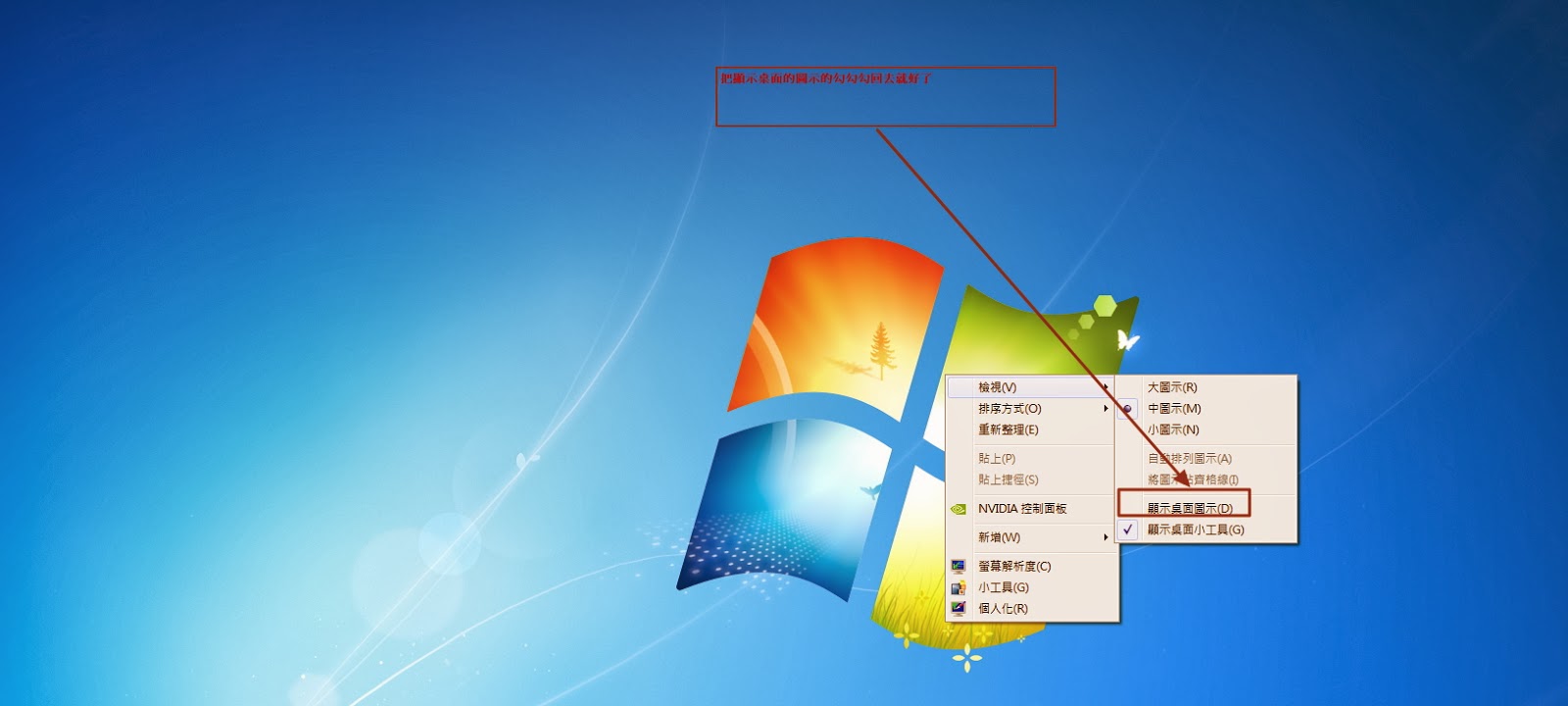
如果發現電腦桌面上的圖示和檔案突然消失不見了,先別急著重裝或認為中毒了,可能只是桌面上檢視功能的顯示桌面圖示沒被打勾而以,勾回去就好。<br />作法如下:<br />在桌面按滑鼠右鍵=>檢視==>把顯示桌面圖示打勾桌面上的圖示就回來了。<br /><div class="separator" style="clear: both; text-align: center;"></div><div class="separator" style="clear: both; text-align: center;"></div><br /><table align="center" cellpadding="0" cellspacing="0" class="tr-caption-container" style="margin-left: auto; margin-right: auto; text-align: center;"><tbody><tr><td style="text-align: center;"><a href="http://2.bp.blogspot.com/-EzDLOZrcRs8/UsgDtE6jFPI/AAAAAAAAABc/PRPLbw935Y4/s1600/Desktop.jpg" imageanchor="1" style="margin-left: auto; margin-right: auto;"><img border="0" height="144" src="http://2.bp.blogspot.com/-EzDLOZrcRs8/UsgDtE6jFPI/AAAAAAAAABc/PRPLbw935Y4/s320/Desktop.jpg" width="320" /></a></td></tr><tr><td class="tr-caption" style="text-align: center;"><span style="font-size: small; text-align: start;">按滑鼠右鍵=>檢視==>把顯示桌面圖示打勾</span></td></tr></tbody></table><br />